So now the mobile companion has been announced by Palm and there have been mixed reactions, but it seems like most of it is negative. I can appreciate the boldnest of Palm to venture out and try to establish a new device catagory. I think they are one to something, but it still has room to grow. The main feature that I would like in companion device is the ability to write/ink in slate mode, with the ability to transfer that handwritten input to text.
Palm, Inc. - Products - Foleo
I thought the Internet Tablet (IT) was going to be that device, but I am not a Linux guru and it has not been smooth sailing trying to set up the device to do what I want it to do. I have not given up on it and it does have many good features, but it does not meet my companion device criterea:
1. Easily mobile - laptops are mobile, but not easily mobile.
2. It is ready to use when I need it - the instant on of the Foleo meets that perfectly, the IT is good enough, but a normal pc takes too much time to be ready (even from standby mode).
3. Cost - my companion device is should not cost as much or more than my home computer. I understand paying for mobility, but don't normally need full pc functionality in my mobile companion. (This cost point has kept me out of the UMPC devices).
4. Works seemlessly with the host device/program - I have a couple programs on my pc that I cannot get ported over to my IT, like OneNote, and I think the companion device should be able to extend a portion of program's functions to be synced back to the host device/program.
5. Power lasts all day - I think it is not unreasonable to ask for a companion device to last all day while you are away from the host machine. Maybe that means a better battery or just a better use of the battery that the device has.
Without using the Foleo yet, I would dare to say that it meets criteria 1, 2, 4 and 5. The cost of the Foleo is a little disappointing given that is not overly feature laden. Overall, I am reserving final judgement on the Foleo, until it comes to market and I have a chance to try one. I also have enjoyed the inovative designs from Jeff Hawkins and crew every since the Handspring Visor, so if this Foleo is not "it" than I believe another iteration could get it done.
Have you found your companion device? What is your criterea for a companion device?
Sunday, June 03, 2007
Wednesday, May 16, 2007
Review of the JAVOedge Desktop Charger for the Treo 750

Overview
The JAVOedge desktop cradle is a simple charging station made for your desktop, but don't star into the light.
Design
The overall design of this desktop charging cradle is simple. The cradle has a hard wired USB cable for data syncing and power port for plugging the cradle into a wall outlet for charging the device. When the cradle is receiving power its little blue light on the front of the charger lights up very brightly, but that is all it does. It stays lit the same bright blue whether the device is fully charged, not charged, or even in the cradle at all. If you could tell already, the blue light is a annoying. As a matter of fact, I have to keep the cradle in another room so that we can sleep at night. It also has a useless sync button, since Windows Mobile devices normally auto sense with the computer when connected.
OK, enough negativity. I like the molded device guide that helps to ensure that the device goes on the connector properly without any guess work. The low profile base extends from the back of the cradle to give it plenty of stability and a clean look.
Functionality
The cradle does provide a charge only option via the wall charger, a sync only option via the USB cable or both if the wall charger is used while the USB cable is used. To charge the device, you must use the wall charger. A USB cable alone will not get it done. It charges and syncs data well and is completely plug and play. Unfortunately, I was not able to test this on a Mac as I do not have one yet. As I stated before, the sync button on this model is useless and the blue light on the front of the unit does little for functionality or deign.
I wish the wall charger connector would double as a regular "Treo plug" wall charger. Instead, it is only useful on the cradle alone.
Conclusion
Overall this device delivers on what it promises, charging and syncing. The blue light can be annoying so be warned. I wish it had a slot to charge an extra battery like my Palm designed charger. It would be helpful for a power user like me. At a retail price of $32.95, you could find a comparable cradle for charging and syncing for less.
Saturday, April 14, 2007
Mobile Meetup
Well, we have been here for a couple of hours and got one visitor, my friend Pat. Pat wanted to talk about taxes and I helped him reconcile an issue. Cool and I'm not even a CPA.
So, I was going to flash my n800, but it requires a full charge and it is still charging. I guess this will have to wait until later.
Antoine and I were talking about the next meetup and were thinking about having it at the NYC Nokia store... They would probably kick us out after a while, but it is worth a try. I'll make sure to post about it if we decide to go for it.
Devices

So I am back on a Symbian kick again. More specifically, a Nokia kick. I found a sweet deal on Craigslist; someone wanted a Cingular branded Treo 650 and he was willing to trade his Nokia 9300 and his Nokia e62. So we made the trade and it was a good trade for both of us. I used the 9300 for a few weeks and really like it's form factor. (More on that in another post) I jsut switched to the e62 a couple days ago and am using it for the first time without Good Mobile Messaging. So far so good. If you are not familiar with the Nokia line of mobiles, I highly recommend checking them out, www.nokia.com.
I would dare to say that Nokia is my favorite manufacturer of mobile phones/devices. What is your favorite device or manufacturer?
So, I was going to flash my n800, but it requires a full charge and it is still charging. I guess this will have to wait until later.
Antoine and I were talking about the next meetup and were thinking about having it at the NYC Nokia store... They would probably kick us out after a while, but it is worth a try. I'll make sure to post about it if we decide to go for it.
Devices
So I am back on a Symbian kick again. More specifically, a Nokia kick. I found a sweet deal on Craigslist; someone wanted a Cingular branded Treo 650 and he was willing to trade his Nokia 9300 and his Nokia e62. So we made the trade and it was a good trade for both of us. I used the 9300 for a few weeks and really like it's form factor. (More on that in another post) I jsut switched to the e62 a couple days ago and am using it for the first time without Good Mobile Messaging. So far so good. If you are not familiar with the Nokia line of mobiles, I highly recommend checking them out, www.nokia.com.
I would dare to say that Nokia is my favorite manufacturer of mobile phones/devices. What is your favorite device or manufacturer?
Wednesday, February 07, 2007
My device adventure updates
It has been way too long since I have posted here, so here I go...
I have been using a Nokia e62 at work on the Good Mobile Messaging server and it is a good device. After being a Treo on Good Link user for a couple years, I have to admit that the Good Mobile Message client on the Nokia e62 falls short because it does not have a good launcher screen with an agenda view. When I spoke with the folks at Good, they said it was in development.... we will just have to wait and see.
In the mean time, I am using a Treo 650 for my personal mobile and it is still a great device. I didn't realize how much I missed the Treo. When I used the Treo, it was with the Good Link client and it dominated the device. I had more of a corporate view of the Treo. Now that Good Link is off the device, I am looking at the device from a consumer perspective.
Here is my Treo 650 set up:
I have been using a Nokia e62 at work on the Good Mobile Messaging server and it is a good device. After being a Treo on Good Link user for a couple years, I have to admit that the Good Mobile Message client on the Nokia e62 falls short because it does not have a good launcher screen with an agenda view. When I spoke with the folks at Good, they said it was in development.... we will just have to wait and see.
In the mean time, I am using a Treo 650 for my personal mobile and it is still a great device. I didn't realize how much I missed the Treo. When I used the Treo, it was with the Good Link client and it dominated the device. I had more of a corporate view of the Treo. Now that Good Link is off the device, I am looking at the device from a consumer perspective.
Here is my Treo 650 set up:
- After a fresh super-hard reset (or zero out), I inserted my personal mobile's SIM. [note: This device is an unlocked Treo 650, but this zero out works for all Treo 650s]
- I loaded the IBM Websphere Java Client, so that I could run the Gmail client and Opera Mini.
- I use the new Java client to download and install the Gmail mobile phone app. [note: The Gmail team does not officially support this client, but from my experience,it does work on the Treo 650.]
- I again use the Java client to download and install Opera Mini. I find that this browser make the EDGE connection a little more efficient for surfing the web.
- I beamed the Bible+ application and a bible from Sarah's Treo.
- Now I make my own simple version of a launcher, I move the apps I use most into the Main category. This allows me to leave the device on this category and I find that it makes my mobile use very efficient. It also allows me to add other programs and not junk up "my launcher".
- Finally, I add a device password for security. Everyone should do this.
I run a voice and unlimited data plan from Cingular, so this configured device is now a lean mean mobile productivity machine. I never thought an older smartphone would be "new again".
Have you every rediscovered something? (It does not have to be tech related)
Tuesday, September 12, 2006
New Device Announcements
There were several new mobile device announcements. The New Treo 750 and the Nokia E62 caught my attention. The Treo is long awaited update to the Treo 650 for the GSM mobile network. I actually got to check out a Nokia E 62 a couple weeks ago and it is nice. While I don't have a lot of experince with Symbian OS devices, I am tempted to get one when they are released on September 29. While thw Treo 750 is only available in Europe right now, I am sure it will come to America soonest.
What new devices are yall looking forward too?
What new devices are yall looking forward too?
Wednesday, May 17, 2006
Communication

For the past couple months Sarah and I have been involved in a marriage mentoring class with an experienced couple from our church. It has been a real learning experience and we are not quite half way through the material. This latest block of study has been on communication. I have learned that I am not the great communicator that I thought I was. It has challenged me to look deeper at the elements that make up communication, good and bad, and address them in my life and in Sarah. The thing that prompted this post was a verse that I read in Proverbs. [By the way, if you have not read any or all of the book of Proverbs in the Bible, I highly recommend it.]
Proverbs 10:7-10
He who corrects a scoffer gets dishonor for himself, And he who reproves a wicked man gets insults for himself. Do not reprove a scoffer, or he will hate you, Reprove a wise man and he will love you. Give instruction to a wise man and he will be still wiser, Teach a righteous man and he will increase his learning. The fear of the Lord is the beginning of wisdom, And the knowledge of the Holy One is understanding.
Does this mean that we should reserve correction, relative to God's way, for other Christians? Does standing on a street corner telling everyone in earshot to repent or your going to hell really advance God's kingdom? Perhaps we should live out our lives as a follower of Christ and allow that along with the Holy Spirit to work on the unbeliever's heart so that when they do seek we can pour the knowledge of God's love through Jesus into them. I am interested in your thoughts on this.
Humbly,
Demetri
Monday, March 06, 2006
Auto tires and road hazards
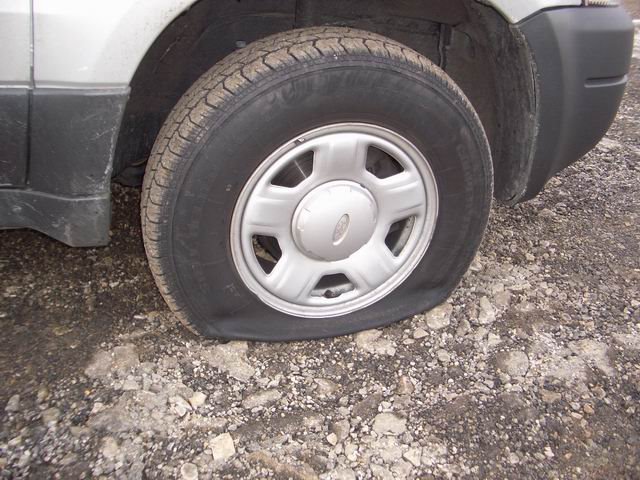
Friday night I rubbed a curb with my right rear tire while making a turn and it did more damage than I thought. The next morning I discovered that I had a flat. Upon closer inspection, I had sliced the sidewall, an unrepairable problem.
Thankfully, when I purchased the tires just a couple weeks before, I opted for the road hazard warranty. It saved me $64 and I only had to pay for labor and tire disposal fee, $17.
I post this to encourage you all to remember to get the road hazard warranty. It is worth it.
Theft

Thursday night someone broke into my car and "tossed" it. They went through everything. They only stole a laptop power source and an external DVD drive made for laptops. At first I was amazed and then I was upset. After stewing in my anger and trying to put it into perspective by reading the Word, I finally calmed down.
Why to people steal stuff like that? I mean they passed up sunglasses, a leatherman and decent backpack that I had in my car. It seemed so random, but I guess they were interested in potential pawn value of the computer accessories.
I've often wondered what I would do if I caught someone in the act. What would you do?
Thursday, March 02, 2006
Mobile Device Virus Alert

I saw this article on a new virus for mobile devices. If you have a Nokia 6681, Sony-Ericsson W800i, or the BlackBerry 8700c, this new virus could affect your device.
See this link (edited).
Please read and protect your device with the appropriate measures.
I currently do not run any anti-virus software on my devices, Treo 650 or SMT 5600. However, I am starting to think that I should since I use both devices on the Internet.
Do you use your phone/PDA phone/ Smartphone on the Internet? If so do you use virus protection for your device? If so what type if virus protection do you use and why?
Monday, February 27, 2006
Refocus

Ok, I started this blog with grand ideas that it would serve as a conversation spot for mobile computing and how it enhanced my daily living. After much consideration and a lack of posting material, I decided to instead open up the focus to the broader subject, "An insight to my life...".
I think this new focus will make this blog more relevant to people in my life and who I meet. I hope that the new focus will allow me to develop a journaling/ blogging discipline as a way to communicate to a broader range of people.
Thanks for still coming back to read this. Especially Zach!
Do you blog? Why?
Monday, January 30, 2006
Bible on my smartphone
I had a Bible on one of my older PDAs, but it didn't always have the PDA on me, so it was about as useful as the printed version of the Bible. (Which is to this day very important) Last week I loaded up a couple versions, NASB and NIV, of the Bible to my smartphone. The program I chose was from Laridian, www.laridian.com. Palmsolo had done a review on the software for his smartphone and gave it a positive review, so I decided to give it shot for myself. Check out his review:
http://www.palmsolo.com/2005/03/review-laridian-pocketbible-for.html
I have gotten a lot of use out of it thus far. I normally have my smartphone with me if I am leaving my house, so that means that I also have a copy of the Bible with me too. This is helpful for memorization, random requests for look-ups, quotes "for the moment" and filing those down times with valuable time in the Word. I have found that when I go to the phone and see that Bible icon, it even acts as an accountability mechanism to get me back into the Word.
For any Palm users who are looking for a Bible, in addition to Laridian there is a freeware version of various Bibles, called Bible Plus. Check it out at:
http://palmbibleplus.sourceforge.net/index.htm
My friend Antoine uses and supports the software. While I have not used it yet, he gets a great deal of use out of it.
Do you have a Bible on your mobile device/s? Do you have other books on your mobile device/s? Why or why not?
http://www.palmsolo.com/2005/03/review-laridian-pocketbible-for.html
I have gotten a lot of use out of it thus far. I normally have my smartphone with me if I am leaving my house, so that means that I also have a copy of the Bible with me too. This is helpful for memorization, random requests for look-ups, quotes "for the moment" and filing those down times with valuable time in the Word. I have found that when I go to the phone and see that Bible icon, it even acts as an accountability mechanism to get me back into the Word.
For any Palm users who are looking for a Bible, in addition to Laridian there is a freeware version of various Bibles, called Bible Plus. Check it out at:
http://palmbibleplus.sourceforge.net/index.htm
My friend Antoine uses and supports the software. While I have not used it yet, he gets a great deal of use out of it.
Do you have a Bible on your mobile device/s? Do you have other books on your mobile device/s? Why or why not?
Monday, January 23, 2006
Mobile Pictures
So I am sending this from my smartphone, SMT5600.
I am using Splashblog to take and post pictures from my smartphone.
While their site does not say that it works on windows mobile 2003SE,
it does work.
Check it out ...
http://www.splashblog.com/mobilecowboy
Do you post pictures on the fly from your mobile device?
Friday, January 20, 2006
Device 2
OK, so after the theft of my visor, bought a used Palm IIIxe. It was comparable to the Visor and was fairly rugged for it's time. I got some good use out of it before I gifted it to a friend, who used it until it stopped working.
I would recommend the Palm IIIxe to anyone looking to explore mobile computing with a PDA. I still have mine and might try to repair it to pass it on to a new user.
Do you keep your old PDAs, sell them or simply pass them on?
I would recommend the Palm IIIxe to anyone looking to explore mobile computing with a PDA. I still have mine and might try to repair it to pass it on to a new user.
Do you keep your old PDAs, sell them or simply pass them on?
Monday, January 16, 2006
Mobile Posts
Ok, so I spoke too soon. There is a way to post via mobile device besides going through a Web browser. Check this link out:
http://help.blogger.com/bin/answer.py?answer=1131
http://help.blogger.com/bin/answer.py?answer=1131
I would have set it up by now to give some feedback on the process, but my mobile carrier, Cingular, is having issues with it's data connectivity in this area. I think that issue may be related to 'network upgrades'. It is the universal, catch-all excuse for IT issues. Once I get reconnected on my mobile device, I'll give it a try and post my experience with setting up moblogging, as the above article calls it.
Do you currently Moblog? If so how often?
Sunday, January 15, 2006
Posting problems
Well, I didn't make last night's post. I remembered just as I was meeting some friends for dinner and I thought that I could make a post from one of my mobile phones, an Audiovox SMT 5600. I got to the Blogger login screen, entered my username and password, but could not "click" on the sign in button. It was highlighted, but I could not make the "click".
I assumed it would not have been a big deal because I made my first post with my Treo 650. I can only assume there is a browser incompatibility issue. I am going to research this more, but I would have hoped that something like Blogger would be mobile friendly.
While I am not a Web site designer, I would encourage those that do build Web sites to keep mobile users in mind when building your site. Yahoo has been mobile friendly for a while and Gmail recently did the same. How important to you is it that Web sites are mobile friendly?
I assumed it would not have been a big deal because I made my first post with my Treo 650. I can only assume there is a browser incompatibility issue. I am going to research this more, but I would have hoped that something like Blogger would be mobile friendly.
While I am not a Web site designer, I would encourage those that do build Web sites to keep mobile users in mind when building your site. Yahoo has been mobile friendly for a while and Gmail recently did the same. How important to you is it that Web sites are mobile friendly?
Friday, January 13, 2006
Devices
I have been using handheld computers since the early days of Handspring. I was really taken by the Springboard concept and just had to get a Visor. So my first device was a Visor Deluxe, ice color. I was so enthusiastic about it and got so much use out of it, I ended up helping a couple of my friends decide to get the Visor Color edition. During my time with the Visor, I had several Springboard accessories. First I got the backup card. Definitely a good investment, as AAA batteries don't always last as long as you may hope. I also got a memory card adapter for CF cards. It kinda worked, but I was never impressed. Finally, I invested in the Minstrel modem. It allowed me to be online anywhere I could get a Verizon Wireless signal. I thought it was so cool that I could sit in a park and IM with my friends while they were probably chained to their desktop pcs.
Well that chapter in geekdom closed when our office was broken into and my Visor was stolen. Thankfully I didn't have any springboard modules in it at the time, so I only lost the device and cradle. I sold the modem and CF adapter, but kept the backup module just in case I ever decided to get nostalgic and get another visor. Well, last year my boss had an original Visor that his wife used to use but no longer needed. You guessed it, I have it now and have used it to introduce my girlfriend to mobile computing. She now has moved onto a Clie.
So that was device number one for me. I'll continue to share about my devices and how they fit into my life, but I am curious about others encounters. What was your first device? Do you still have it? Are you using it?
Well that chapter in geekdom closed when our office was broken into and my Visor was stolen. Thankfully I didn't have any springboard modules in it at the time, so I only lost the device and cradle. I sold the modem and CF adapter, but kept the backup module just in case I ever decided to get nostalgic and get another visor. Well, last year my boss had an original Visor that his wife used to use but no longer needed. You guessed it, I have it now and have used it to introduce my girlfriend to mobile computing. She now has moved onto a Clie.
So that was device number one for me. I'll continue to share about my devices and how they fit into my life, but I am curious about others encounters. What was your first device? Do you still have it? Are you using it?
Thursday, January 12, 2006
New Year
New Year's Resolutions... Why is it always so difficult to come up with new ones? Well, it has taken me this long to come up with mine, blogging.
I would like to create a blog that is worth visiting. One that has fresh content on a regular basis. So my resolution is to make a post daily in the month of January. My thought is that if I post daily for several weeks straight, it will become a habit and I will be on my way to creating a 'worthy' blog. I can't promise that the content will be exciting, but there will be something new daily.
So today's post is done. What are your New Year's Resolutions?
I would like to create a blog that is worth visiting. One that has fresh content on a regular basis. So my resolution is to make a post daily in the month of January. My thought is that if I post daily for several weeks straight, it will become a habit and I will be on my way to creating a 'worthy' blog. I can't promise that the content will be exciting, but there will be something new daily.
So today's post is done. What are your New Year's Resolutions?
Sunday, December 18, 2005
My First Post
The purpose of this blog is share my adventures in mobile computing and how it is a tool in my life.


Subscribe to:
Posts (Atom)
